Using OSINT to Verify Recruiters and Detect Job Phishing
A practical guide to conducting background investigations (OSINT) on employers, checking domains, analyzing email metadata, and identifying targeted phishing campaigns.
Sarah Jenkins, CISA
Lead Information Security Auditor & OSINT Specialist
Sarah Jenkins is a certified information security auditor and threat intelligence investigator. With over a decade of auditing experience, she publishes deep technical guides on smart contract vulnerabilities, IAM misconfigurations, metadata leaks, and supply chain threats.
With the rise of distributed teams and remote work, the job market has encountered a new threat—high-tech job scams and recruitment phishing. Attackers masquerade as recruiters from well-known companies to collect job seekers’ personal data, gain access to their financial credentials, or compromise their devices to use them as staging grounds for attacks on corporate networks (APT campaigns targeting SRE, DevOps, and developers).
A standard resume contains enough information to craft a highly targeted spear-phishing attack. When actively looking for a job, a candidate’s vigilance is lowered, making them willing to open attachments, complete technical assignments, and follow links from strangers.
In this article, we will examine how to apply OSINT (Open Source Intelligence) methodologies to quickly and reliably verify a recruiter’s identity and identify fraudulent job offers before sending them confidential information.
1. Common Recruitment Fraud Scenarios
Fraudulent recruiting campaigns generally fall into three categories:
- Identity Theft: Collecting scans of passports, social security numbers, and bank details under the guise of “drafting an employment contract.”
- Technical Task Phishing (Payload Delivery): Sending malicious software under the guise of a “technical assignment,” a “project source code archive,” or “special testing software.” This is most frequently aimed at DevOps engineers with privileged access to cloud infrastructure.
- Financial Schemes (Advance Fee Fraud / Tasks Scam): Requiring payments for “training materials,” “software licenses,” or “certifications” prior to starting work, with promises of reimbursement on the first paycheck.
2. Step-by-Step OSINT Domain Verification
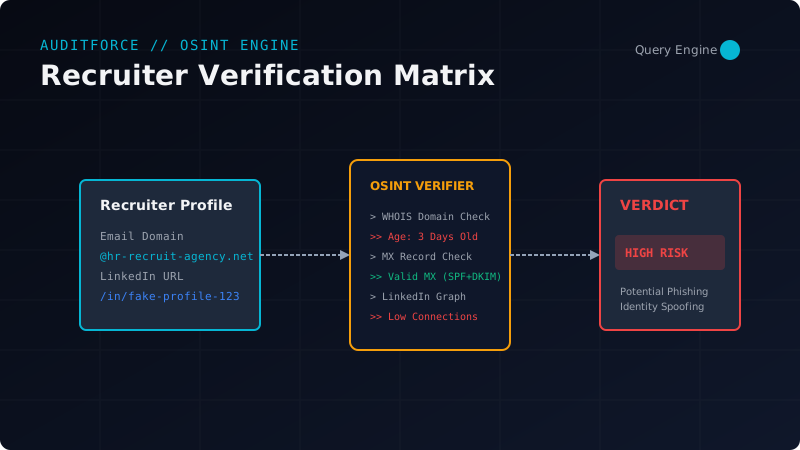
The simplest and most effective indicator of a vacancy’s legitimacy is the domain the recruiter is emailing from (or the domain of the website listed in the contacts).
Step 1: Checking Domain Age and Owner via WHOIS
Scammers often register domains that look visually identical to well-known brand domains (Typosquatting or Combosquatting, such as google-careers-hr.com instead of google.com).
Run the whois utility in your terminal:
whois google-careers-hr.comWHOIS Output Red Flags:
- Domain Age: If the domain was registered less than 3–6 months ago, but the company claims to have been on the market for 15 years, it is almost certainly a scam.
- Registrar: Use of free or cheap registrars popular with spammers (e.g., Namecheap, Hostinger, Freenom).
- Privacy Protection: The use of privacy protection services to hide registrant information for a major public company (large brands typically register domains under their corporate entities directly).
Python Script for Rapid Domain Checks
Let’s write an automated script to parse WHOIS records and highlight suspicious domains:
import whois
from datetime import datetime

def analyze_domain(domain_name):
    print(f"[*] Analyzing domain: {domain_name}")
    try:
        w = whois.whois(domain_name)
    except Exception as e:
        print(f"[-] Failed to fetch WHOIS: {e}")
        return

    # Extract creation date
    creation_date = w.creation_date
    if isinstance(creation_date, list):
        creation_date = creation_date[0]

    if not creation_date:
        print("[-] Creation date not found.")
        return

    # Calculate age in days
    age_days = (datetime.now() - creation_date).days
    print(f"[+] Registration date: {creation_date}")
    print(f"[+] Domain age: {age_days} days")

    # Flag young domains
    if age_days < 180:
        print("[CRITICAL] WARNING: Domain is registered less than 6 months ago!")
    else:
        print("[+] Domain age is normal.")

    # Show registrar information
    print(f"[+] Registrar: {w.registrar}")
    print(f"[+] Country: {w.country}")

analyze_domain("google-careers-hr.com")
3. Analyzing Email Headers
If you receive an email from a “recruiter” at a major company but the sender domain raises suspicion, you must inspect the raw email headers.
Open the raw email content (in Gmail: “Show original”, in Outlook: “View message source”).
Look for three key email authentication headers: SPF, DKIM, and DMARC.
ARC-Authentication-Results: i=1; mx.google.com;
       dkim=pass [email protected] header.s=google header.b=XyZ;
       spf=pass (google.com: domain of [email protected] designates 192.0.2.1 as permitted sender)
       dmarc=pass (p=REJECT sp=REJECT dis=NONE) header.from=legit-agency.com
What to Look For:
- SPF (Sender Policy Framework): Shows whether the server with the sending IP address is authorized to send emails on behalf of the domain. If
spf=fail, the email was sent from a rogue server masquerading as the domain. - DKIM (DomainKeys Identified Mail): A cryptographic signature ensuring email integrity. If the signature is missing or invalid (
dkim=fail), the body of the email could have been altered in transit. - DMARC (Domain-based Message Authentication): A policy stating how the receiving server should act if SPF/DKIM verification fails. If a company has a strict policy (
p=reject), but you see an email with afailstatus in your inbox (which can happen due to poor receiver configuration), it is a forgery.
If a recruiter writes from a third-party domain (such as @gmail.com, @outlook.com, or @proton.me) claiming to represent Microsoft or Google, this is a reason to cut off communication. Internal recruiters always use corporate domains.
4. Verifying the Recruiter’s Social Media Profile
If the email domain checks out, proceed to analyze the recruiter’s digital footprint.
LinkedIn Profile Checklist:
- Connections Count: A real recruiter typically has over 500+ contacts. Profiles with 10–50 connections are often created for disposable spam campaigns.
- Activity History: Real recruiters regularly repost corporate job updates, write posts about hiring, or comment on other professional threads. A blank “Activity” tab on a profile that is several years old is a major warning sign.
- Company Verification: Check the “People” tab on the official company’s page. Is the recruiter listed there? Does their profile match the design and style of other employees at that company?
- Reverse Image Search: Download the recruiter’s avatar and run it through reverse image search engines (Google Images, Yandex Images, PimEyes). Scammers often steal photos of real people (models, random users from other networks) or use AI-generated portraits (e.g., from ThisPersonDoesNotExist).
Signs of an AI-Generated Portrait:
- Blurry, asymmetrical, or mathematically illogical background objects.
- Odd artifacts around the ears, earrings, or glasses (one frame leg differs from the other).
- The pupils of the eyes are perfectly centered on the canvas.
5. Security Measures for Technical Assignments
The most dangerous attack vector is malicious payloads delivered under the guise of a technical test. SRE/DevOps engineers are primary targets. Attackers send archives with titles like:
infra-deploy-test.zip(containing.exefiles or hidden malicious scripts masquerading as.shor.batfiles).- Packages requiring the installation of custom NPM, Python, or Go dependencies from untrusted external repositories.
- GitHub repository links containing malicious scripts embedded in CI/CD configuration files (e.g.,
.github/workflows/build.ymldesigned to steal your AWS or Kubernetes credentials when you fork or trigger a build).
Safe Technical Test Rules:
- Never execute technical test code on your host machine. Always use an isolated environment: a virtual machine (VirtualBox, VMware) or a disposable Docker container without mounting host directories.
- Analyze scripts before running. Open any provided scripts in a plaintext editor before execution. Scan for encoded strings (
base64), suspicious network requests (curl,wgetto unknown IPs), and attempts to read files from directories like~/.ssh/,~/.kube/, or~/.aws/`. - Use sandboxes to inspect files. Upload suspicious files and archives to VirusTotal or Any.Run for dynamic sandbox behavior analysis.
Conclusion
Information security is a continuous process of verification. Scammers are continuously refining their techniques to make fake vacancies virtually indistinguishable from legitimate ones. By spending just 5 minutes checking domain age, verifying email authentication, and analyzing the recruiter’s profile, you can safeguard your personal data, professional reputation, and credentials from compromise.
Remember the golden rule of OSINT: trust, but verify.
Read more job search privacy & security guides on the AuditForce blog.
Related Posts
Securing WireGuard Mesh Networks in Production Environments
A technical blueprint for deploying encrypted internal transit overlays with automated key exchange, routing hardening, and strict ACL policies.
Securing AWS IAM Policies Against Privilege Escalation
A guide to scanning, identifying, and remediating dangerous IAM wildcard permissions and complex trust relationships using automated least-privilege auditing.
Metadata Leakage in CV Files (PDF/DOCX) and De-identification Methods
How resume files expose your real name, OS, GPS coordinates, company structure, and internal GUIDs. A complete guide to sanitizing metadata before submission.
Understanding Password Strength and Crack Time Estimates
Why traditional passwords fail, how entropy is calculated, and what makes a truly secure password in the modern age.
Implementing Zero-Trust Network Architecture at Scale
How to enforce micro-segmentation, mutual TLS, and continuous credential rotation across hybrid cloud infrastructure using automated network policies.
On this page
Category
security-guidesRelated Posts
Securing WireGuard Mesh Networks in Production Environments
A technical blueprint for deploying encrypted internal transit overlays with automated key exchange, routing hardening, and strict ACL policies.
Securing AWS IAM Policies Against Privilege Escalation
A guide to scanning, identifying, and remediating dangerous IAM wildcard permissions and complex trust relationships using automated least-privilege auditing.
Metadata Leakage in CV Files (PDF/DOCX) and De-identification Methods
How resume files expose your real name, OS, GPS coordinates, company structure, and internal GUIDs. A complete guide to sanitizing metadata before submission.
Understanding Password Strength and Crack Time Estimates
Why traditional passwords fail, how entropy is calculated, and what makes a truly secure password in the modern age.
Implementing Zero-Trust Network Architecture at Scale
How to enforce micro-segmentation, mutual TLS, and continuous credential rotation across hybrid cloud infrastructure using automated network policies.